eOffice® Network – Domain Naming & Usage Rules
Last modified: July 8, 2026
Introduction
An eOffice® Domain is your professional online identity. This page outlines the rules and requirements for domain naming on eOffice® Network. Understanding these guidelines will help you select an appropriate domain name and use it properly.
eOffice® Network serves a wide range of individuals and organizations — including professionals in every field, businesses of every size, non-profits, community groups, educational institutions, trade associations, religious organizations, government agencies at all levels (federal, state, local, tribal, and intergovernmental), military units and support organizations, political campaigns and causes, cultural institutions, and more. These Naming & Usage Rules apply to all eOffice® Domains regardless of your profession, industry, community type, organizational structure, or sector.
Before creating or licensing an eOffice® Domain, please review our Domain License Agreement and Trademark Guidebook for complete terms and proper trademark usage.
Understanding eOffice® Domains
An eOffice® Domain consists of several parts working together. The diagram below shows how an eOffice® Domain is structured:
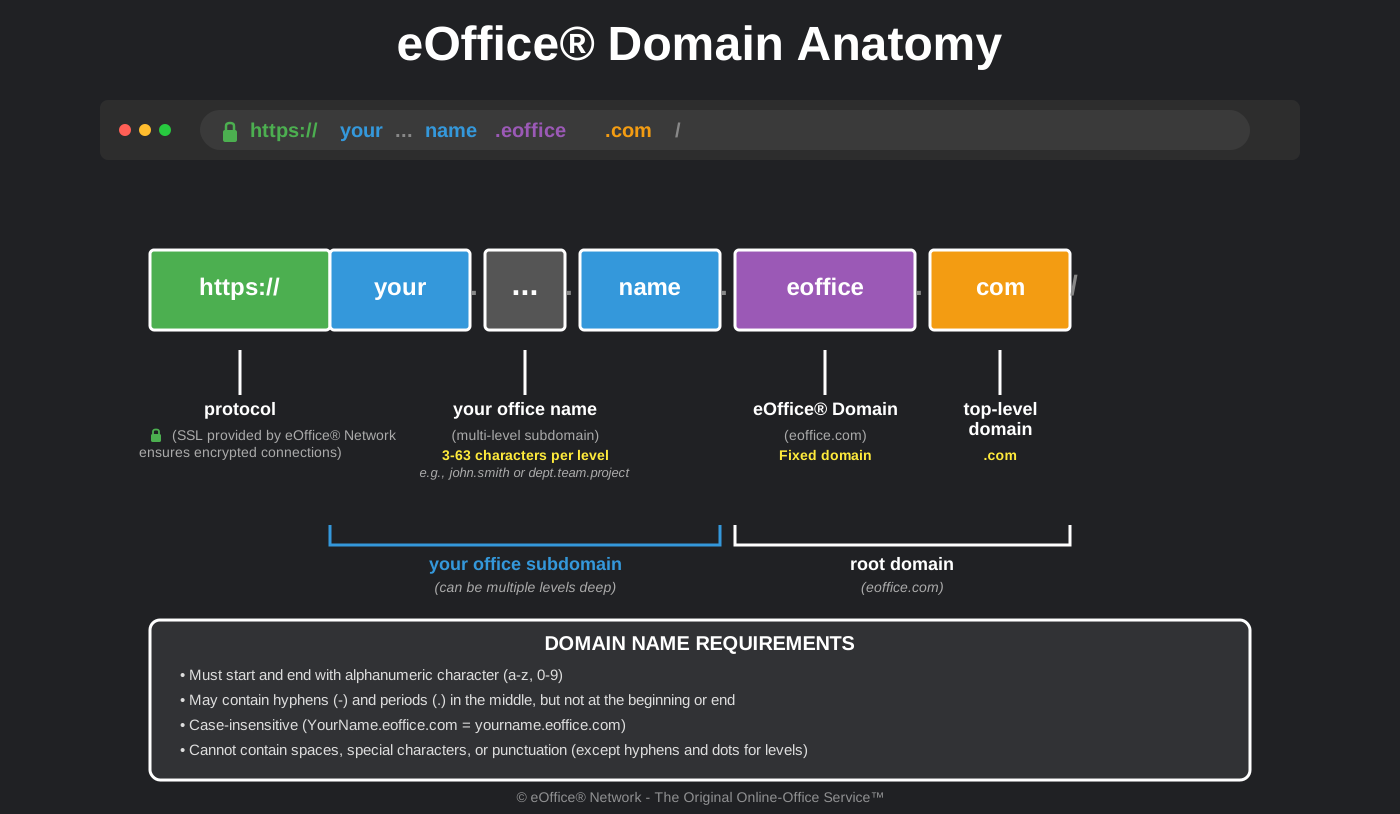
Domain Components Explained
Protocol (https://)
All eOffice® Domains are secured with SSL/TLS certificates provided and managed by eOffice® Network. This ensures your connection is encrypted and displays the secure lock icon in web browsers. You don’t need to obtain or manage certificates yourself.
Your Online Office Name (Subdomain)
This is your unique identifier on eOffice® Network. Your online office name becomes a subdomain of eoffice.com. It can be a personal name, organization name, project name, department name, campaign name, or any other professional identifier.
Examples (placeholders — use your own name or identifier):
- Personal: first.last.eoffice.com | your.name.eoffice.com | dr.name.eoffice.com
- Business & Commercial: your.business.eoffice.com | your.company.eoffice.com | your.brand.eoffice.com
- Country / Nation: your.country.eoffice.com | your.nation.eoffice.com | your.state.eoffice.com | your.province.eoffice.com | your.territory.eoffice.com
- Government, Military & Public Sector: your.agency.eoffice.com | your.department.eoffice.com | your.unit.eoffice.com
- Geographic & Community: your.city.eoffice.com | your.town.eoffice.com | your.region.eoffice.com | your.neighborhood.eoffice.com | your.district.eoffice.com
- Educational: your.campus.eoffice.com | your.school.eoffice.com | your.alumni.eoffice.com
- Non-Profit & Trade: your.organization.eoffice.com | your.association.eoffice.com | your.guild.eoffice.com
- Causes, Campaigns & Community: your.campaign.eoffice.com | your.initiative.eoffice.com | your.community.eoffice.com
- Organizations & Projects: your.dept.eoffice.com | your.project.eoffice.com | your.lab.eoffice.com
- Multi-level: your.dept.project.eoffice.com | your.brand.region.eoffice.com
- Length: 3-63 characters per subdomain level
- Format: Must start and end with an alphanumeric character (a-z, 0-9)
- Allowed characters: Letters, numbers, hyphens, and periods to separate levels
- Case: Not case-sensitive (yourname = YourName)
- Multi-level: Can be multiple levels deep (your.name.eoffice.com | your.dept.project.eoffice.com)
eOffice® Domain
All eOffice® Domains are subdomains of eoffice.com. This is the fixed root domain for all online offices on eOffice® Network.
- Domain: eoffice.com (fixed, cannot be changed)
- TLD: .com
- Complete format: your.office.name.eoffice.com
Community, Organization & Agency Eligibility
While an eOffice® Domain always ends in eoffice.com, eligibility to license an eOffice® Domain may require verification of your affiliation with an eligible community, organization, institution, agency, unit, or cause. Your community, organization, institution, agency, unit, or cause must be activated on eOffice® Network before you can license an eOffice® Domain. For more information about eligibility and the registration process, please see our Sunrise Registration policy.
Domain Naming Rules
Required Standards
eOffice® Domain names must comply with the following technical requirements based on internet standards (RFC 1035, RFC 1123):
- Character Requirements
- Use only alphanumeric characters (a-z, A-Z, 0-9) and hyphens (-)
- Cannot start or end with a hyphen
- Cannot contain spaces, underscores, or special characters
- Not case-sensitive (treated as lowercase)
- Length Requirements
- Minimum: 3 characters
- Maximum: 63 characters per label (subdomain)
- Total domain length: 4-253 characters including all parts
- Format Requirements
- Must be a valid subdomain format
- Cannot contain consecutive hyphens (except for internationalized domains)
- Must be unique within eOffice® Network
Naming Best Practices
- Professional Identity: Choose a name that represents your professional identity
- Keep it Simple: Shorter names are easier to remember and share
- Avoid Numbers: Unless they’re part of your professional identity, avoid random numbers
- Be Consistent: Use the same name across different locations, branches, or offices if applicable
- Future-Proof: Consider how your name will age over time
Prohibited Content
eOffice® Domains must not:
- Infringe on trademarks or intellectual property rights of others
- Impersonate another person, organization, or entity
- Contain offensive, abusive, or inappropriate language
- Violate applicable policies, community standards, or organizational rules
- Misuse the eOffice® trademark (see our Trademark Guidebook)
- Be misleading about your affiliation or authority
- Include protected terms without authorization
Domain Usage Guidelines
Acceptable Use
eOffice® Domains should be used for:
- Professional correspondence and communication
- Academic, business, or governmental collaboration
- Personal or organizational professional branding
- Portfolio, resume, or official presentation
- Professional networking and connections
- Projects aligned with your organization’s, community’s, agency’s, or cause’s mission
Prohibited Use
You may not use an eOffice® Domain for:
- Illegal activities or content
- Spam, phishing, or malicious activities
- Hosting or distributing copyrighted material without permission
- Harassment, hate speech, or discriminatory content
- Activities that violate your organization’s, community’s, agency’s, or applicable acceptable use policies
Domain Transfer and Changes
Changing an eOffice® Domain Name
Once selected, domain names generally cannot be changed. Choose carefully. In exceptional circumstances, please contact us to discuss options.
Transferring an eOffice® Domain
Domain transfers between users, organizations, or agencies must be authorized by eOffice® Network. See our Domain License Agreement for transfer policies and procedures, or visit our Domain Transfer page for more information.
Community, Organization & Agency Activation
Before individual domains can be created, your community, organization, institution, agency, unit, or cause must be activated on eOffice® Network.
How to Request Activation
If your community, organization, agency, or cause is not yet activated, please contact us with the following information:
- Community/Organization/Agency name
- Primary domain (e.g., yourschool.edu, yourcity.gov, youragency.mil, yournonprofit.org)
- Contact person name and official email address
- Verification of affiliation with the community, organization, agency, or cause
Submit activation requests via our Contact Form.
Enforcement and Violations
eOffice® Network reserves the right to:
- Review domain names for compliance with these rules
- Suspend or terminate domains that violate our policies
- Require domain name changes if they violate trademarks or policies
- Remove content that violates acceptable use guidelines
- Report illegal activities to appropriate authorities
To report domain name violations or abuse, please use our Contact Form.
Additional Resources
- Domain License Agreement – Complete terms and conditions
- Domain Transfers – Transfer your domain to another user, organization, or agency
- Sunrise Registration – Register a domain during the sunrise period
- Trademark Guidebook – Proper use of eOffice® trademark
- Terms of Service – Overall service terms
- Privacy Policy – How we handle your data
- Contact Us – Questions or support